
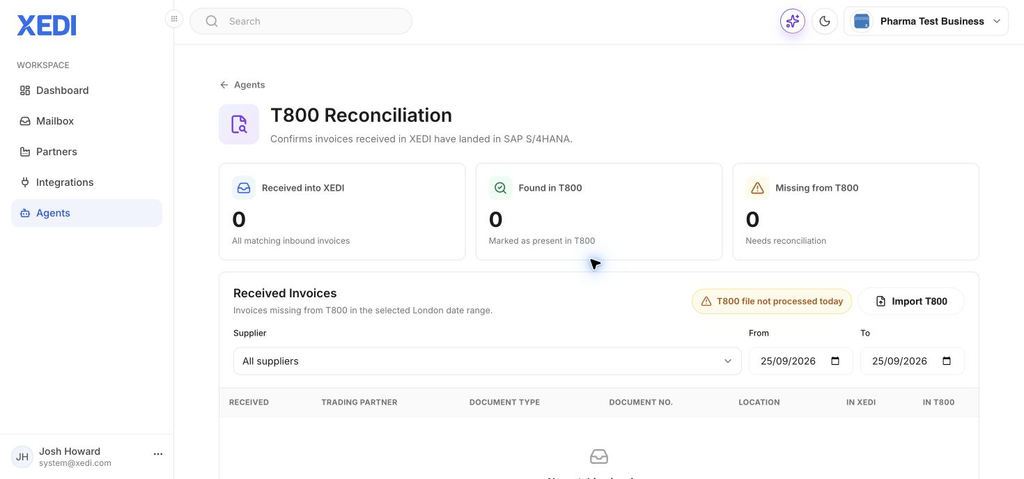
T800 Reconciliation helps you confirm that inbound invoices received in XEDI have landed in SAP S/4HANA.
Understand the summary
The three totals show invoices received into XEDI, invoices found in T800, and invoices that need reconciliation. Use them as a quick check before reviewing the invoice list.
Review a date range
- In XEDI, open Agents and select T800 Reconciliation.
- Choose a supplier, or leave All suppliers selected.
- Set the From and To dates for the period you want to check. The report uses the London date range.
- Review the received-invoice table, including the partner, document type, document number, location and the XEDI and T800 status columns.
Check the T800 file status
The screen warns when a T800 file has not been processed for the day. Invoices received after the last successful file may not appear in T800 yet, so check that status before treating an invoice as missing.
Import a current T800 file
Use Import T800 only when you have the correct file ready to process. Once imported, refresh or rerun the reconciliation view to see the updated status.
If an invoice is missing
First confirm the selected supplier and date range. Then check the latest T800 file status and allow for any invoices received after the last processed file.